




























































































Disclaimer
Hello everyone! Before we get started, I want to let you know that FiiO sent me the K15 so I could test it properly, spend real time with it, and share my honest thoughts. I’m not being paid for this review, and FiiO hasn’t told me what to write, asked to see my review before posting, or set any publishing schedule.
Table Of Content
- Disclaimer
- Introduction
- Unboxing
- Technical Specifications
- Specs
- Features
- Display and Interface
- Knobs and Controls
- Inputs and Outputs
- Gain Levels
- PEQ
- App Control
- Streaming and Connectivity
- Knob Indicator Lights
- Settings Menu
- How It Actually Performs
- Sound Character
- Background Noise
- Power Output
- Heat
- Daily Use and Overall Experience
- K15 vs K17
- K15 vs K13 R2R
- Conclusion
- Pros
- Cons
- Q&A
- Who is the FiiO K15 for?
- Who should avoid the FiiO K15?
- What are some good alternatives to consider?
Everything you’ll read here is based entirely on my own experience with the K15. I always try to be as fair and objective as possible, but at the end of the day this is still just my personal opinion. We all judge products differently, and those differences are part of what makes this hobby so interesting and enjoyable.
A big thank you to FiiO for giving me the chance to review the K15, and of course, a huge thank you to you for taking the time to read and support my reviews. It truly means a lot to me!
Introduction
I’ve been waiting a good amount of time to finally sit down and do this review, and yeah, I know I’m a bit late to the party. But here I am with the FiiO K15, and if you’ve been curious about it and you want to hear my perspective on this device, let’s get into it.
The FiiO K15 is not an entry level desktop DAC and amp, but it is also not a full flagship piece either. As I see things nowadays, I’m not sure it’s worth going any higher than that, and I will explain this better later in this review. The K15 is definitely meant to be serious, but it is still trying to stay in a price and size that makes sense for a normal desk setup.
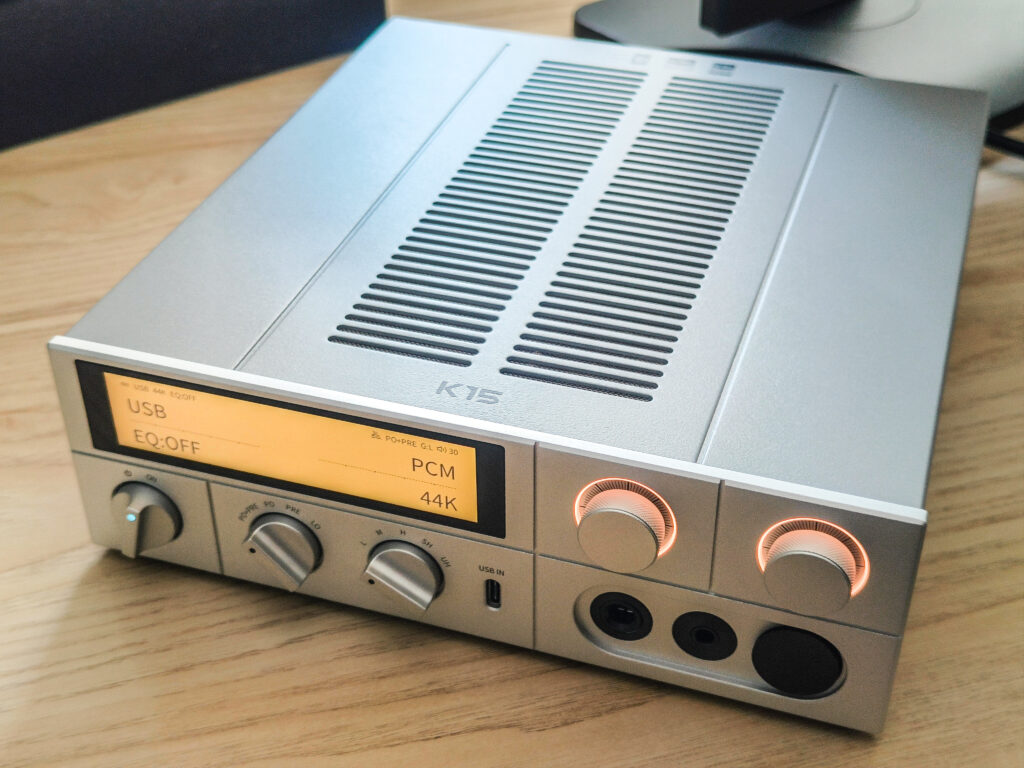
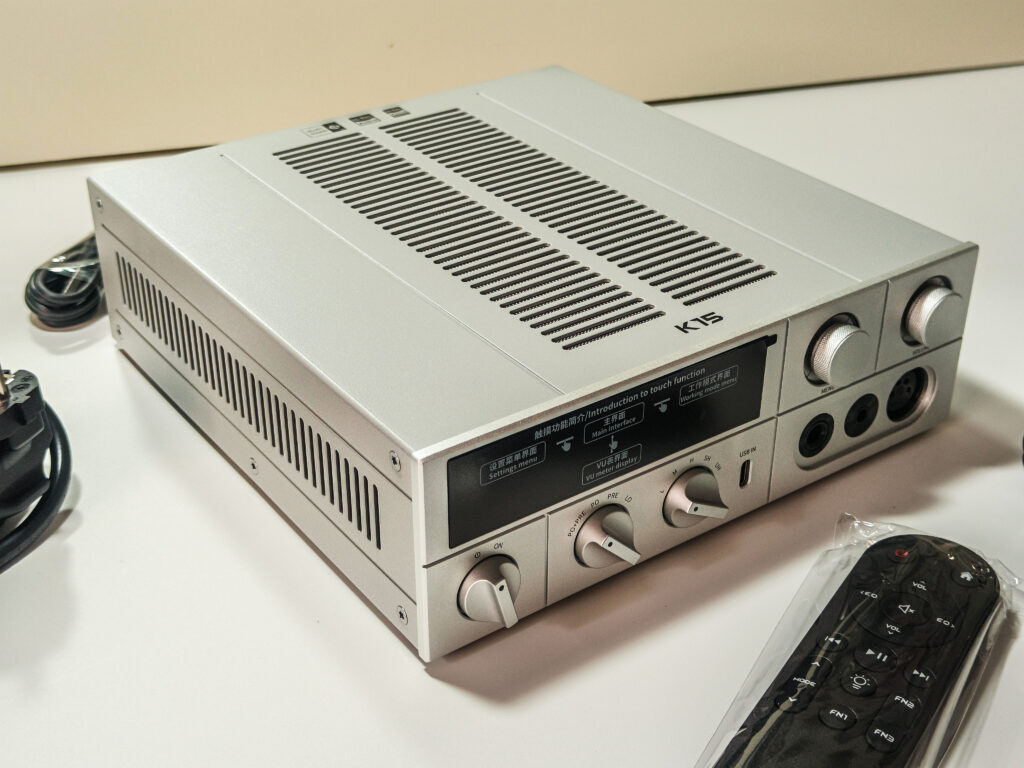
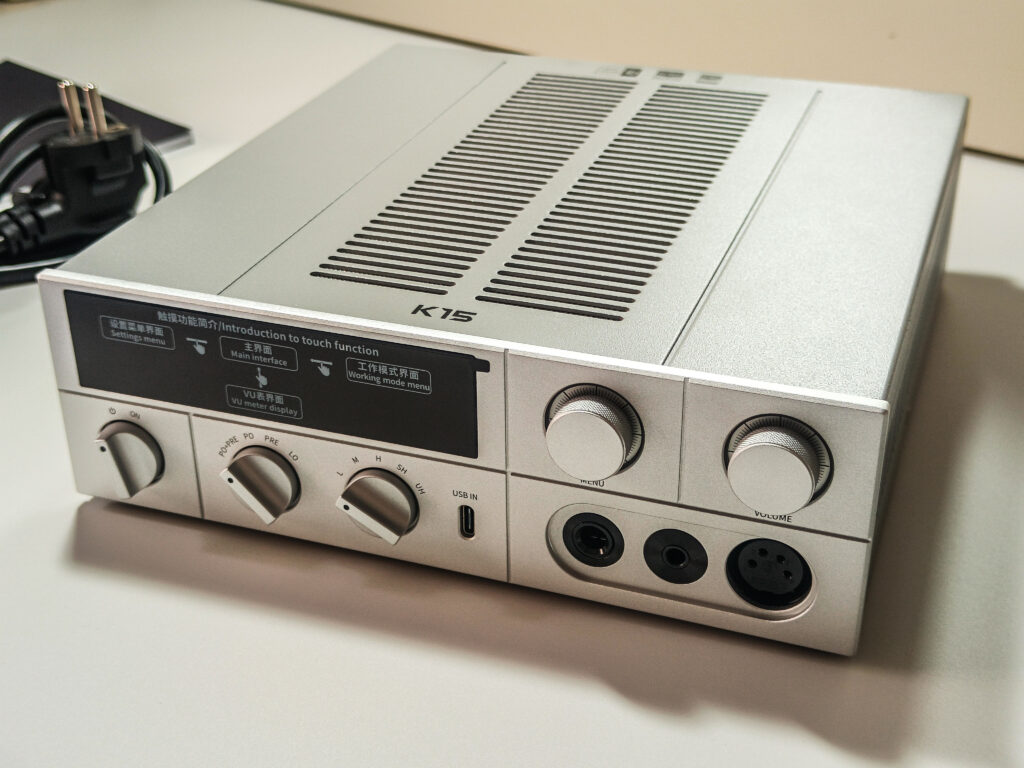
What grabbed me right away is the look. It has a modern vibe but with a little retro look to it, especially with the way the front panel looks. There are a good amount of switches and knobs, and I actually like that. I know some people like a more minimalistic look, but in real world use, I actually prefer when I can just quickly reach out, change what I need, and that’s it.
The other big thing is that it feels like FiiO designed it to be a one and done for your entire setup. You get a lot of inputs and outputs, so whether you are connecting a PC, a streamer, powered speakers, an amp, or anything else that comes to your mind, the K15 is built to cover pretty much all the scenarios most people will want. And to top it off, the touchscreen is a nice touch. It makes the whole thing feel more modern and more convenient, especially when you are switching things around or checking what is going on without needing to start going to the menu with knobs or buttons. It just makes everything more intuitive.
That is basically the angle of this review. I am looking at the K15 as a one and done desktop hub that can pretty much do almost everything very well without having the flagship price tag. And yes, I will mention the K17 sometimes, even though I don’t have it, but it’s the bigger brother of the K15 and costs almost twice at 999$ while the K15 is priced at 549$ in context. but the focus here is still on what the K15 gives you on its own.
Unboxing
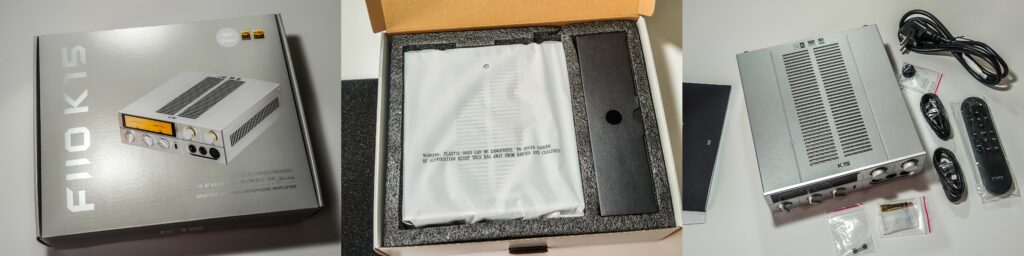
The box looks fine. Silver-gray, clean, with a big photo of the K15 on the front and the product’s name, of course. It’s not trying too hard, and honestly, it just looks like most FiiO boxes do. Pretty recognizable at this point.
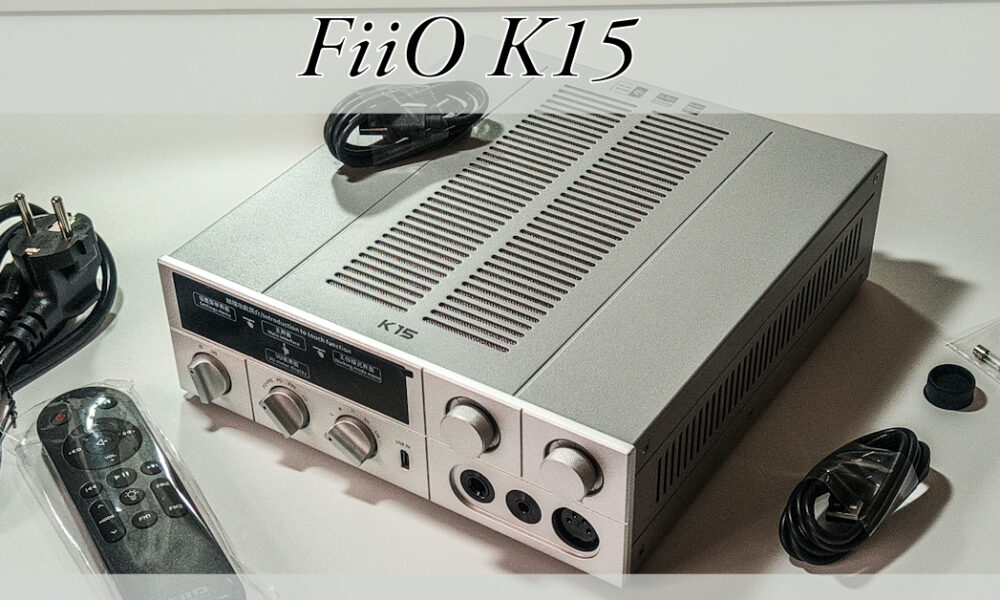
Inside, the K15 sits in a foam cutout with a separate compartment next to it for the accessories. You get two USB cables, an AC power cord, a 6.35mm to 3.5mm headphone adapter, an IR remote, a spare fuse, and an XLR4 dust plug for the balanced output port. That spare fuse is a nice small touch I genuinely appreciate. Most people will never need it, but when that day comes, you’ll be happy it was sitting in the box.
What I noticed again, though, is the missing batteries for the remote. No AAAs included. At $549, that feels a bit odd to me, because I really don’t love the idea of having to go buy something extra just to use a product I just paid good money for. Everything else feels pretty complete, so that one thing sticks out. Small thing, but worth knowing.
Overall, nothing to really complain about here. The packaging suits what the K15 is, the accessories are solid, and nothing feels like it was cut. FiiO did a good job with this one.
Technical Specifications
Specs
- Name/Model: FiiO K15
- Color: Black / Silver
- Dimensions: 244.6 x 213 x 66.8mm
- Weight: ~2100g
- Display: 3.93-inch LCD (240×1020) bezel-less touchscreen
- DAC chips: AK4497S x2 (AKM Velvet Sound)
- Hardware solution: Main control X2000, MCU ESP32-S3, USB decoding XU316, Bluetooth QCC5125, AMP MJE243G/253G discrete transistors
- Working modes: USB DAC / Coaxial / Optical / Line in / Balanced in / Bluetooth / Streaming / Local playback (8 total)
- Gain levels: 5 (Low / Medium / High / Super High / Ultra High)
- PEQ: 10-band, supported on all digital inputs
- Bluetooth: 5.1, SBC / AAC / aptX / aptX LL / aptX HD / aptX Adaptive / LDAC
- WiFi: 2.4G / 5G dual-band
- Ethernet: Gigabit LAN port
- MQA: Full decoding supported
- Streaming: Roon Ready, AirPlay supported
- Local playback: USB storage supported
- Volume control: Knob / Touchscreen / IR remote
- Power supply: AC 100-240V 50/60Hz, or DC 12V / 2.5A external
- Front outputs: 3.5mm single-ended, 4.4mm balanced, XLR4 balanced
- Front inputs: USB-C (USB audio in)
- Rear outputs: RCA single-ended line out, XLR3 balanced line out
- Rear inputs: RCA coaxial in, optical in, RCA line in, 4.4mm balanced line in
- Rear connectivity: USB-C x2 (data + RS232), USB-A x1, Gigabit LAN
- Rear power: IEC AC inlet, DC barrel input, power rocker switch
- Grounding terminal: M4 banana port
- Headphone output impedance: less than 1 ohm (SE), less than 1.5 ohm (BAL)
- Headphone output power (balanced, 32 ohm, ultra high gain): 3000mW + 3000mW
- Headphone output power (SE, 32 ohm, ultra high gain): 1400mW + 1400mW
- THD+N (balanced): less than 0.00059% (1kHz)
- SNR (balanced): 122dB (A-weighted)
- Frequency response: 20Hz to 20kHz, attenuation less than 0.2dB
- Max USB decoding: 768kHz / 32bit, DSD512 native
- Max streaming decoding: 384kHz / 32bit, DSD256
- FiiO Control app: Supported
Features
Display and Interface
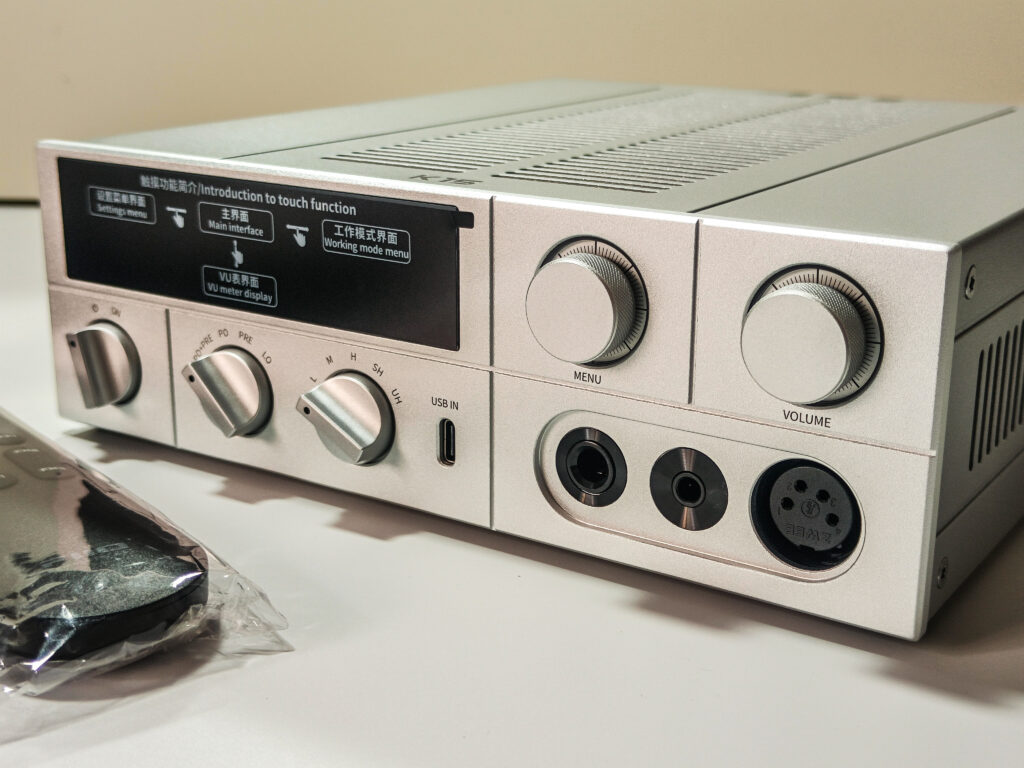
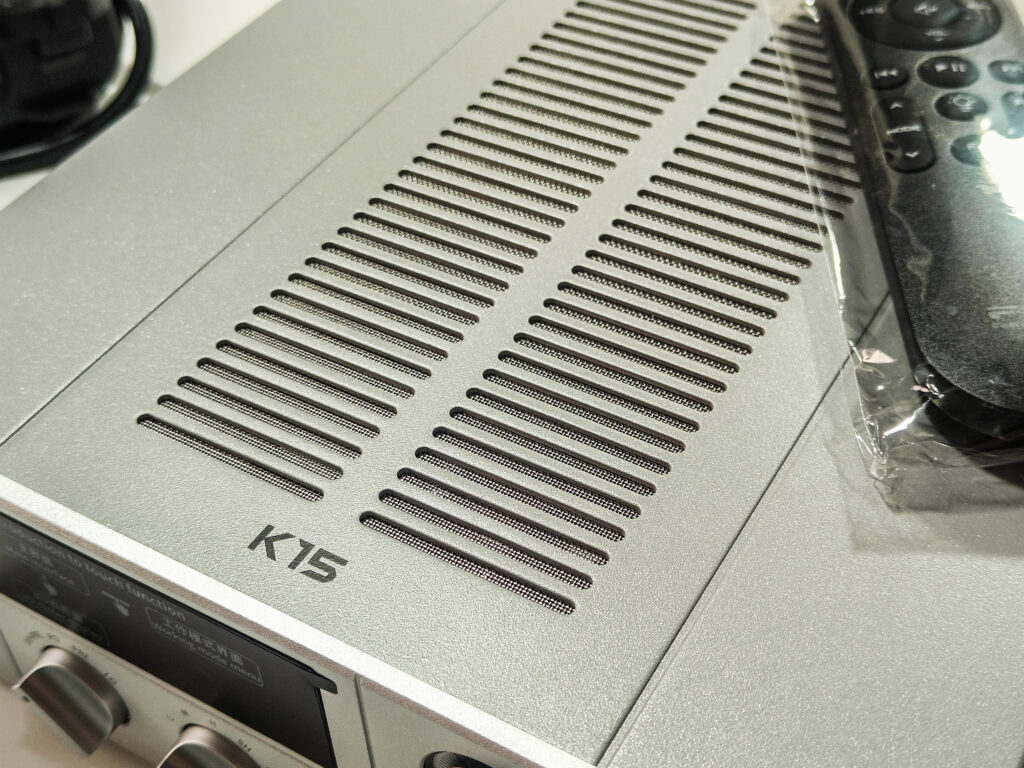
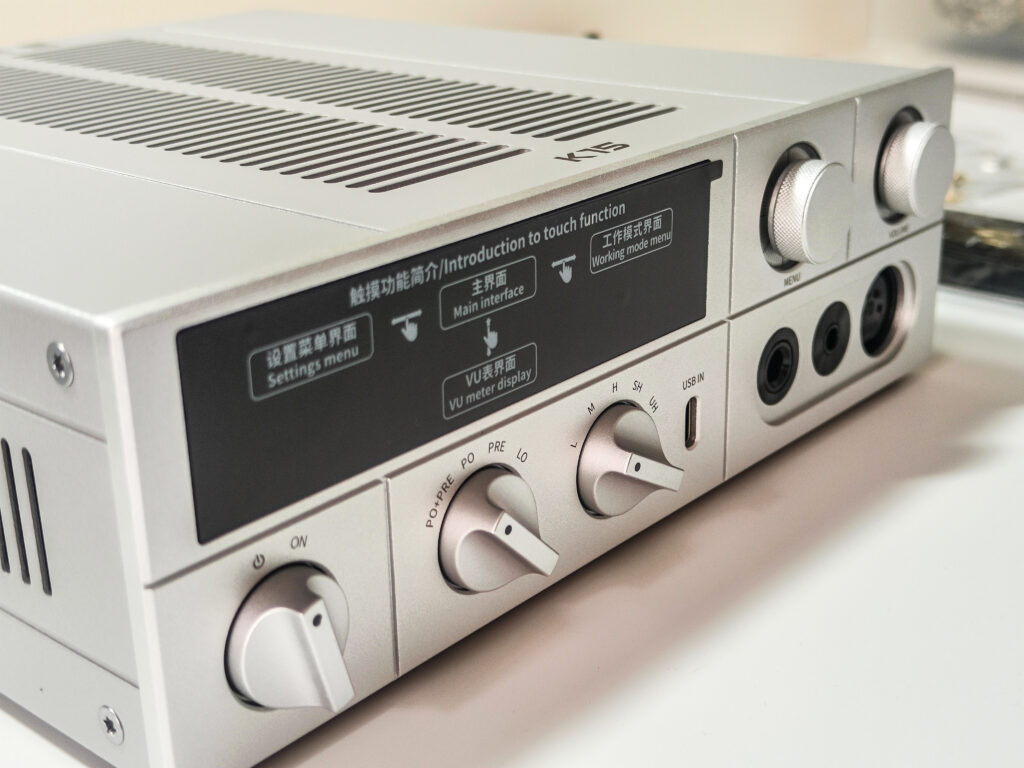
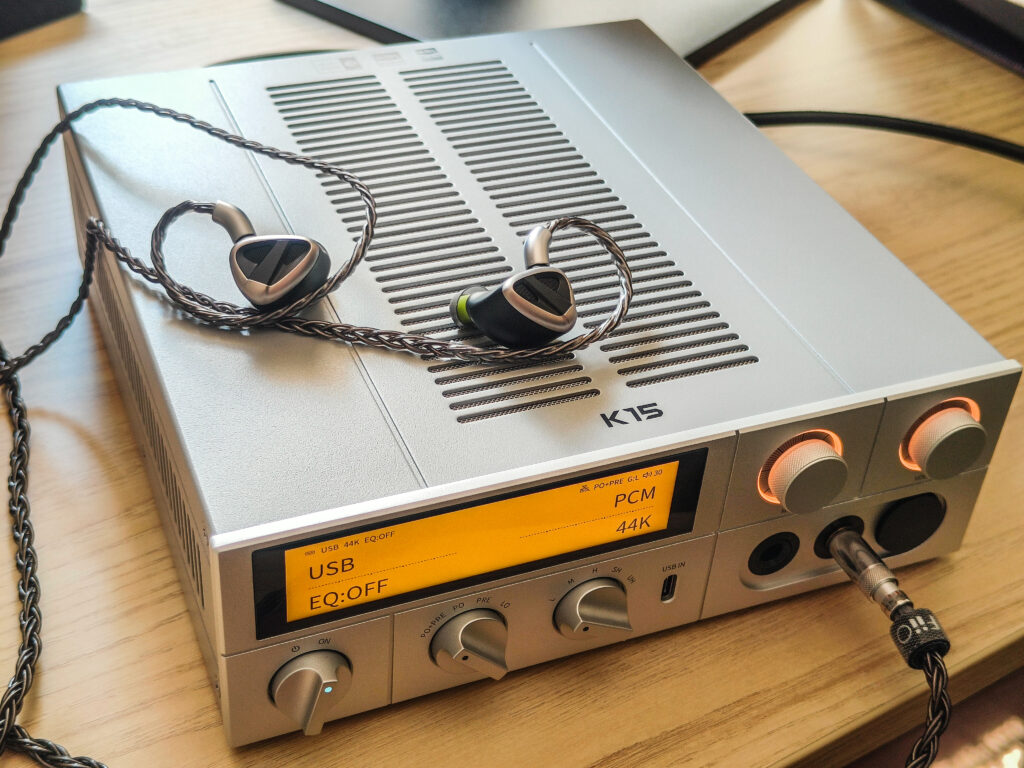
The screen is one of the best things to have when you are actually using the K15. It’s a 3.93-inch bezel-less LCD that works as the main interface, and it does the job super well in practice. You can swipe through menus, check your current input, gain level, EQ status, network connection, and what Bluetooth codec is active, all right there. It also has a VU meter animation in streaming and local playback modes, which fits the retro look of the unit nicely. It’s so convenient to use, and it adds to the whole experience.
Knobs and Controls
The front panel control layout is super easy to get used to, and it makes a lot of sense. From left to right you have a power knob, a mode selector, a gain selector, a menu knob, and a volume knob. The knob also doubles as a button. There’s also a USB-C input on the front for a shorter cable and without the need to reach for the back. All the knobs feel great, smooth, and well built. No wobble, no cheap feel anywhere.
Inputs and Outputs
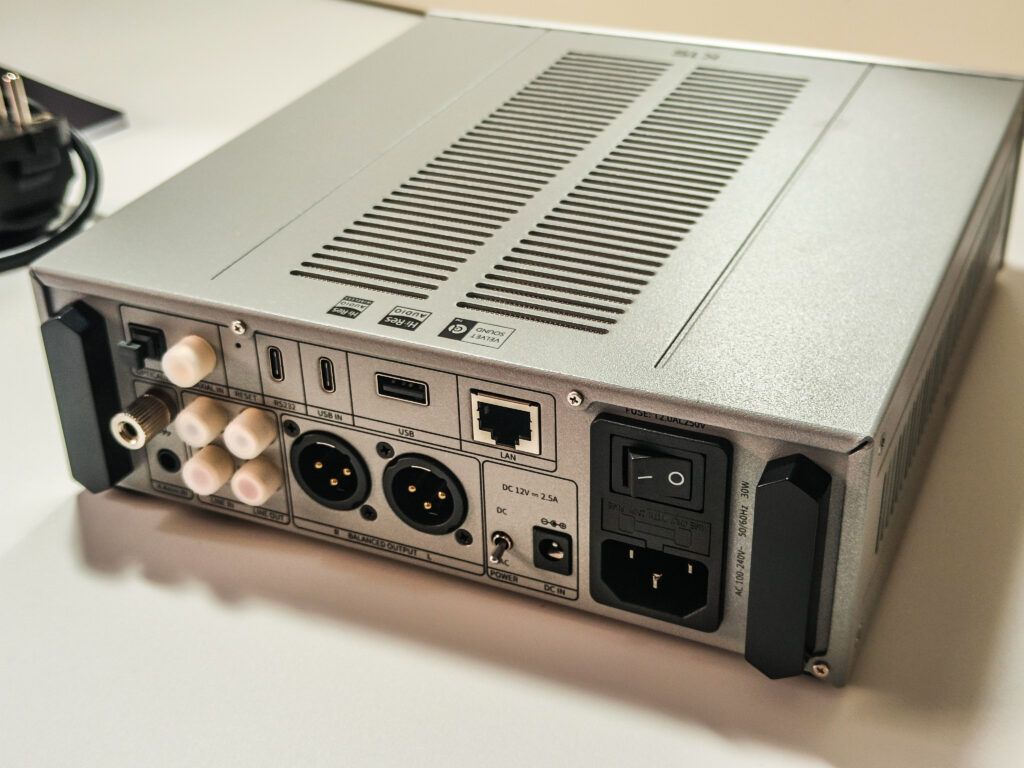
The back panel covers pretty much everything you’d ever need or want. You get coaxial in, optical in, RCA and 4.4mm balanced analog inputs, RCA and XLR3 balanced line outputs, two USB-C ports (one is RS232), a USB-A port for flash drives, a Gigabit LAN port, a 12V DC barrel input for an optional external linear power supply, and the main IEC AC inlet with a rocker switch. There’s also a reset hole and a grounding terminal, which is a small practical detail that can matter in certain setups. Everything is clearly labeled, so it’s easy to control.
Gain Levels
The 5-level gain system is very useful here. It’s very easy to access, and having five steps rather than the usual two or three gives you a lot more flexibility when switching between sensitive IEMs and harder to drive headphones. In daily use it makes the K15 much more comfortable to control as a proper all purpose desktop amp, but I’m still not sure if you actually need the extra two modes, as I think 3 can do for like 90% of users…
PEQ
The 10-band PEQ works across all digital inputs, so USB, coaxial, optical, Bluetooth, streaming, and local playback are all covered. The only exception is the analog line inputs, which bypass the DSP entirely as expected. You can change the presets directly on the touchscreen or through FiiO’s web-based PEQ tool or the FiiO Control App.
App Control
The FiiO Control app lets you manage most settings remotely, which is handy if the unit sits a bit further back on your desk. To some it can change the experience drastically, and it’s a very nice and convenient option to have.
Streaming and Connectivity
The K15 supports Gigabit wired LAN and dual-band WiFi. It’s Roon Ready and supports AirPlay, which is nice, but it lacks Google Cast, TIDAL Connect, Spotify Connect, and more. It could have been awesome if these were also supported. Bluetooth 5.1 with LDAC support means wireless listening is actually a proper option here, not just an afterthought thing.
Knob Indicator Lights
Worth a quick mention, the knob indicator lights are customizable. You can set a fixed color, adjust brightness, or switch to an RGB pulse mode. Small thing, but it might be important to some.
Settings Menu
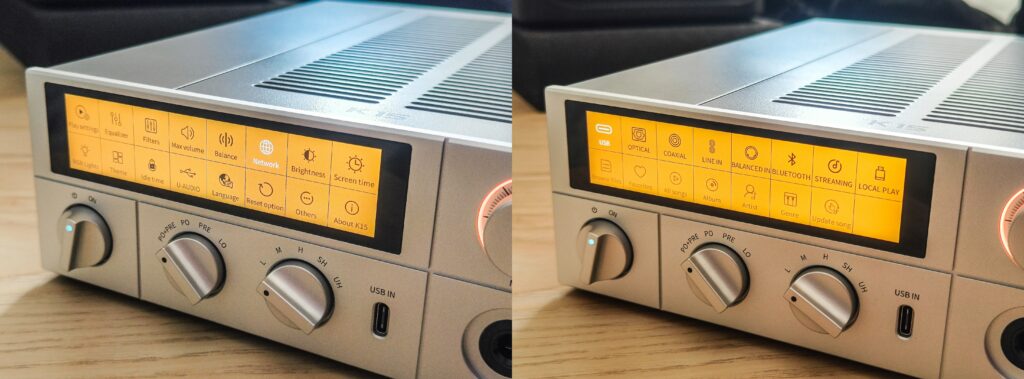
The settings menu is more complete than I expected for this price. From the touchscreen you can access play settings, filters, a max volume limiter, left/right channel balance, network configuration, screen brightness, screen timeout, idle time, theme selection, and RGB knob light control. There’s also a U-AUDIO option for switching USB audio class mode depending on your source device or OS and a language option, reset, and an about page. Everything is very easy to find and control.
The input selection screen is equally clean. All 8 working modes sit right there on one page, USB, optical, coaxial, line in, balanced in, Bluetooth, streaming, and local playback, so switching between sources is just a tap away. When you’re in local playback mode, the screen also gives you proper library navigation with browse files, favorites, all songs, album, artist, genre, and even an update song option to refresh your library. For a desktop unit that doubles as a standalone streamer with a useful level of organization but still lacks some other streaming platforms, which still can make it limited to some.
How It Actually Performs
Let me be straight before I get into this. Describing the sound of a DAC/amp in 2026 is really tricky, because the honest truth is that most reputable brands are building gear that sounds very good, with differences between units being so small that going crazy about them isn’t really worth it. The K15 is no exception, and I’d rather be upfront about that than pretend I heard dramatic differences that simply weren’t there.
Sound Character
It sounds great. The dual AK4497S chips paired with the discrete Class-AB amp section do a really solid job together. Everything sounds neutral and natural, with maybe just a slight touch of warmth compared to something like the Fosi Audio K7 or the ZH3, which lean a bit more on the cooler side. But honestly, I’m not even fully sure those differences are real or just placebo. They’re that small. What I can say is that nothing about the K15’s sound ever bothered me or made me question whether it’s good enough or not or if something is missing or isn’t right. It just gets all those thoughts out of the way and lets your headphones do their thing, which is exactly what a good DAC/amp should do.
Background Noise
Complete silence. Running sensitive IEMs on low or medium gain, I got no hiss, no buzz, nothing at all. For a unit that can push 3000mW balanced, that’s an impressive noise floor and something that matters a lot if IEMs are part of your regular rotation.
Power Output
Not an issue at all. I threw an AKG K712 Pro, a Beyerdynamic DT990 250 ohms, the FiiO FT1 Pro, a HiFiMAN HE4XX, and the FiiO FT7 at it, and all were driven comfortably with plenty of headroom to spare. The five gain levels actually made this even easier to control (when you are constantly switching between headphones), letting you match the gain properly to whatever you’re using without consistently playing with the volume knob.
Heat
Runs warm but never hot. The ventilation grid does its job, and even after extended sessions it never became something I thought about. Completely normal for a 30W desktop unit.
Daily Use and Overall Experience
This is honestly where the K15 really shows that its a higher tier device. Switching between headphones and speakers, adjusting gain, switching EQ presets of setting a new one, changing inputs, or using the remote from across the room, all of it just works greatly. The touchscreen is responsive, the knobs feel good, and the menu is super easy to navigate through. It’s the kind of usability you fully appreciate after using gear that lacks it.
K15 vs K17
Quick note before this one. I don’t have the K17, so this isn’t a sound comparison. I just felt it was worth addressing it based on specs only because they look almost identical and get compared constantly.
The K17 sits at 999$, roughly double the K15’s price, so it’s worth being specific about what you actually get for that. The most significant difference is the DAC chipset. The K17 uses AKM’s flagship setup, the AK4191 paired with dual AK4499EX chips, while the K15 uses dual AK4497S chips, which are still high tier, just a step below the flagship. I haven’t heard the K17 myself, so I won’t speculate on how different they sound in practice, but both are serious chips from the same family.
Beyond the DAC, the K17 also gets a dedicated DSP chip enabling a 31-band PEQ versus the K15’s 10-band, a built-in toroidal linear power supply versus the K15’s switching supply, slightly higher output at 4000mW balanced versus 3000mW, and digital coaxial and optical outputs on the back, which the K15 doesn’t have. That last point matters if you ever need to pass a digital signal downstream to another device.
One thing worth knowing though is that the K15 supports an external 12V DC PSU input, something the K17 ironically doesn’t offer in addition to its fancier internal supply. So if you ever want to experiment with a third party linear PSU, the K15 actually gives you that option.
Unless you specifically need the 31-band PEQ, the flagship DAC chipset, the internal linear PSU, or the digital outputs, the K15 covers everything most people would realistically need at nearly half the price. But if those extras matter to you, the K17 is there for a reason.
K15 vs K13 R2R
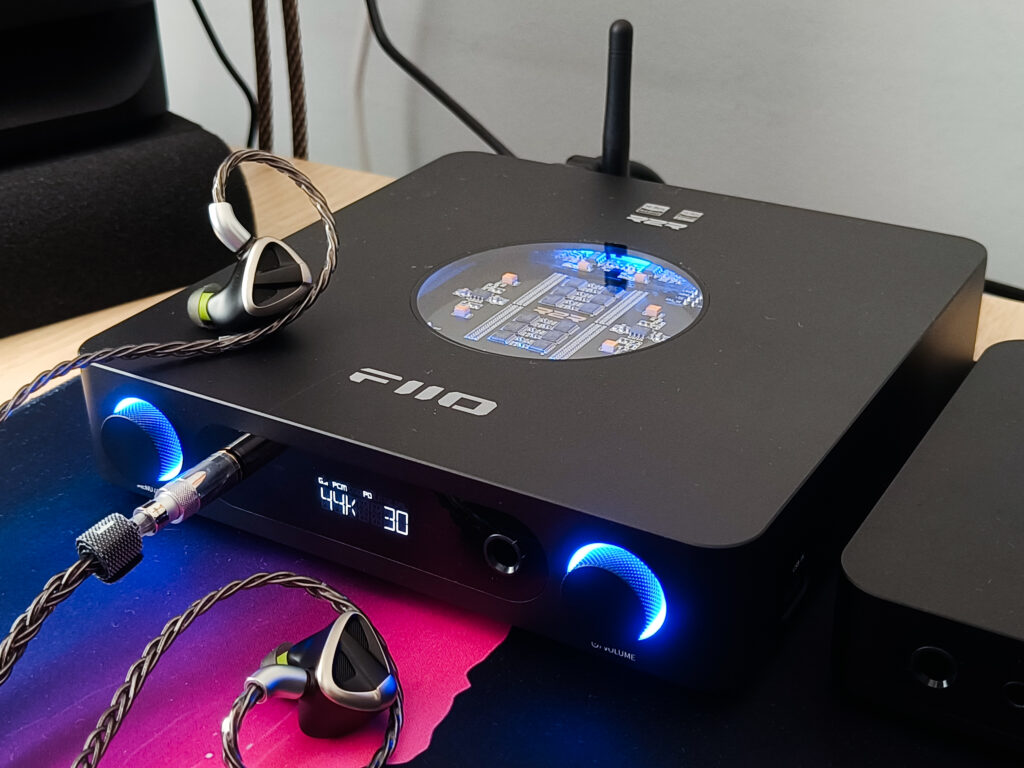
These two sit in pretty different places despite both being FiiO desktop units. The K13 R2R uses FiiO’s own resistor ladder arrays rather than Delta Sigma chips, which is a fundamentally different approach to digital to analog conversion and brings a certain cool factor with it. But as I said in my K13 R2R review, in OS mode most people would struggle to tell it apart from a good Delta Sigma unit in a blind test. Both sound clean and natural.
The K15 has more power at 3000mW balanced vs the K13’s 2400mW, the option to stream with Roon Ready, AirPlay, and Gigabit LAN, a bigger and more complete touchscreen, five gain levels instead of three, and a completely silent noise floor even with sensitive IEMs, which the K13 can’t fully deliver. The K13 is smaller, lighter, and priced at 319.99$ compared to the K15’s 549$.
If you want a simpler, more compact unit and you want an R2R DAC, the K13 is a great option. If you want the a bit more complete, more versatile desktop hub, the K15 is the one.
Conclusion
After having the K15 with me for a while, I can say that FiiO did something quite smart here. They took most of what made the K17 interesting, the design, the power, the connectivity, and the feature set, and brought it down to a price that can actually be somewhat affordable for some.
The build feels premium, the touchscreen and controls are a pleasure to use daily, the noise floor is dead silent, and it has enough power to drive pretty much anything you’d throw at it. The five gain levels, the remote, the PEQ, and the multiple inputs and outputs, all of it makes the package more complete and easy to use daily.
One thing I do want to mention again is the streaming side, and I personally wouldn’t call the K15 a true standalone streamer. It will get the job done for Roon and AirPlay, but if streaming is your main priority and you want a more polished streaming experience, there are dedicated streamers that do it better. The K15 is better described as a very capable DAC/amp that also happens to stream.
At $549, and with everything it brings to the table, I think the K15 is easy to recommend. The missing batteries for the remote are still a small annoyance, but it’s a small thing, and I get that it might be because of shipping regulations for batteries. But outside of that, this is a well thought out product that really delivers what it promises. If you’re looking for a one box desktop solution to manage your headphones, speakers, and some kind of streaming and independent audio playing without too many compromise, the K15 is a very strong choice at this price.
Pros
- Excellent build quality
- Dead silent noise floor, even with sensitive IEMs
- 3000mW balanced output handles pretty much any headphone with ease
- Five gain levels make it flexible for both IEMs and full size headphones
- Large, responsive touchscreen with a clean and intuitive UI
- Complete set of inputs and outputs for headphones, speakers, and external sources
- Roon Ready and AirPlay support
- 10-band PEQ
- Remote control included
- Supports external 12V DC linear PSU input
Cons
- No AAA batteries included for the remote
- Streaming can be functional but not full enough to call it a true streamer
- The price is still a bit high, although I think it’s fully justified.
For more Info: (Non-affiliated! None of my reviews use affiliated links!)
Q&A
Who is the FiiO K15 for?
The K15 is for someone who wants a proper all in one desktop hub that works nicely with both headphones and speakers. If you need real power, a clean noise floor, flexible connectivity, and want Roon Ready or AirPlay support built in, the K15 makes a lot of sense. It is also a great fit for people who like having physical controls, a proper screen, and the ability to control everything from across the room with a remote or through an App.
Who should avoid the FiiO K15?
If your main priority is streaming and you want a true streaming experience with more streaming services support, the K15 might be too limited for that. It streams, but it lacks a bit of option in this regard. It is also probably overkill if you only use IEMs and just need something simple or compact on your desk. And if budget is tight, there are capable options at a lower price point that cover the basics well.
What are some good alternatives to consider?
If you want to stay in the FiiO family and budget isn’t a concern, the K17 or even the K19 are the natural step ups. If you want something more compact and maybe want to try the R2R concept, the FiiO K13 R2R is an amazing option for $319.99 with a genuinely different character. If you are on a tighter budget and don’t need the streaming side, the FiiO K11 R2R or something like the Fosi Audio K7 or ZH3 are worth looking at depending on your needs.




No Comment! Be the first one.